The dream is pretty simple: give AI agents useful work, let them build software in parallel, and get back something you can actually ship. Not a pile of code that looks impressive until somebody tries to use it. Real software that solves problems and creates value.
The missing piece is usually not another model. It is a better way of working.
A software factory gives agents an assembly line: a place to work, guidelines for building, a requirement to prove the result, and a review process before anything gets merged. Ras Mic runs his with roughly five or six Markdown files. No special platform required.
What clicks for me is that this is really about treating agents like an engineering team. You would not give a team of developers one shared workspace, let everybody overwrite everybody else's changes, and accept “it works” as the entire review process. Why do that with agents?
Key Takeaways
- A software factory is a repeatable workflow, not a specific model, coding tool, or platform.
- Separate Git worktrees let agents develop features in parallel without overwriting each other's working files.
- Require before-and-after evidence so agents demonstrate outcomes rather than simply report completion.
- Independent code review sends unfinished work back through building and testing before human approval.
Table of Contents
- What Is a Software Factory?
- Start With an AGENTS.md File That Defines the Workflow
- Step 1: Isolate Each Feature With Git Worktrees
- Step 2: Build With Explicit Code Structure Guidelines
- Step 3: Prove the Work With Before-and-After Evidence
- Step 4: Ship Through an Independent Code Review Loop
- The Physical Factory Analogy Makes This Click
- Build Your Process, Not Somebody Else's Tool Stack
What Is a Software Factory?
A software factory is a repeatable development workflow that packages your skills, standards, and domain knowledge into instructions an agent can follow.
It is model and harness agnostic. The model is the intelligence doing the work. The harness is the tool or environment around it, such as Codex, Claude Code, or Cursor. The factory is the process that tells that combination how to operate.
Most people begin with a much looser workflow:
- Tell an agent what to build.
- Inspect the result.
- Ask for changes.
- Keep going back and forth until it looks good enough.
- Deploy it.
That can get an app off the ground. But it leaves a lot to chance. How is the work isolated? What makes the code maintainable? Did the agent test the feature? Who checks what it missed?
The factory makes those questions part of the process instead of things you remember to ask about later.
Mic's workflow has four steps:
- Isolate: Give each feature its own workspace.
- Build: Write the code according to explicit structural guidelines.
- Prove: Supply evidence that the change works.
- Ship: Run an independent review loop, then present the work for merging.
The point is not just speed. It is speed without giving up quality. More capable models make this increasingly useful, but intelligence alone does not create a reliable development process.
Start With an AGENTS.md File That Defines the Workflow
The coordinating document in Mic's setup is an AGENTS.md file. It provides persistent instructions that the agent receives as part of its working context.
The important distinction is what goes into that file.
A lot of people fill theirs with descriptions of the codebase that the agent could discover by reading the code. Mic uses his to explain something the agent cannot infer from the repository alone: how he wants the development process to run.
That includes which skill to use at each stage, what evidence is required, and what must happen before a task is considered ready.
Think of the main document as the workflow coordinator, with separate skill files supplying detailed instructions:
- A new feature skill handles isolation.
- A code structure skill guides implementation.
- Evidence-driven testing and before and after skills establish proof.
- A Grep Loop skill handles the external review cycle.
This is why the whole thing can fit into a handful of Markdown files. The value is not the file format. It is the judgment encoded in those files.
And the goal is not to copy somebody else's preferences blindly. Understand the process, then adapt it to the way you build.
Step 1: Isolate Each Feature With Git Worktrees
The first rule is straightforward: never build a new feature directly on main.
In Mic's setup, the new feature skill creates a fresh Git worktree with a feature branch starting from origin/main. Each agent gets a separate working directory rather than editing the same checked-out files.
A branch tracks a separate line of development. A worktree gives that line of development its own physical workspace. The Git worktree documentation explains the underlying mechanism if you want the technical details.
Why separate workspaces matter
Imagine we are working on the same app. I want to redesign the landing page. Mic wants to make the API calls faster.
If both agents operate in the same workspace, the performance agent might decide to rewrite a page that the design agent is changing. One agent's perfectly reasonable decision becomes another agent's lost work.
Now give each feature its own branch and worktree:
- The landing page agent changes its own working files.
- The API performance agent changes a separate set of working files.
- Each feature goes through proof and review independently.
- The completed changes are merged back into the main codebase.
This prevents agents from trampling one another's active workspace. It does not make conflicting changes impossible at merge time, but it separates development so those changes can be integrated deliberately.
The analogy is copying a document, working on your own version, then bringing your changes back into the original. You are not trying to type into the same paragraph at the same time.
Parallel work becomes manageable
Mic's working setup included four terminal tabs for four features on the same app, including an email client, a Linux computer environment, and a landing page update. He also described running as many as 15 features concurrently with different agents and subagents.
The interesting part is not the number. It is that every task has somewhere safe to happen.
After a feature is merged, the workflow cleans up its worktree. Isolation is a lifecycle, not just a pile of abandoned copies.
This is normal engineering-team behavior applied to AI agents. Give every task its own station before you ask the factory to move faster.
Step 2: Build With Explicit Code Structure Guidelines
A feature can work and still be written badly.
That distinction matters a lot with AI-generated code. A model may complete the request while leaving duplicated logic, dead code, scattered functions, and decisions that make the next change harder.
Mic's code structure skill gives the agent a specific way to build: service layer architecture.
At a high level, that means organizing the application's operations into clear service boundaries rather than scattering the same behavior throughout the codebase. The point is not to turn every reader into an architecture expert. It is to give the agent a consistent standard instead of letting it improvise the structure on every task.
There are three beneficiaries:
- You: If you are technical, you can understand and review the implementation.
- A future developer: If you hire someone, they have a reasonable structure to work with.
- The next agent: A fresh agent can enter the codebase without needing the entire history of the original conversation.
For example, Mic asked an agent to build a skills repository inside an app so different agents could connect and store their skills. As it implemented the feature, the agent kept referring to the code structure skill.
The request described the outcome. The skill governed how the outcome was built.
That separation is useful. You should not have to restate your engineering standards every time you request a feature. Those standards belong in the factory.
Different models will make different implementation choices. Some produce cleaner code than others. But “use a better model” is not a substitute for defining what good code looks like in your project.
Step 3: Prove the Work With Before-and-After Evidence
This is my favorite part of the system: an agent cannot just promise that it finished.
It has to prove it.
Anyone who has built with agents knows the situation. The agent writes some code, confidently says the bug is fixed, and then you try the app. Same bug.
The agent may have completed an edit without verifying the outcome. The prove step closes that gap.
Use recordings when the environment supports them
The evidence-driven testing skill captures the state before the change, then captures the result afterward.
For a bug fix, the before recording shows the bug happening. The after recording shows the same interaction working. For a new feature, the evidence establishes what was missing and what now exists.
When recording is not available, the before-and-after skill can supply screenshots. The exact medium depends on the environment and the task. The requirement stays the same: demonstrate the change.
One example was an admin email page connected to an email service. The agent's pull request showed the earlier state, where the page did not exist, beside the completed interface.
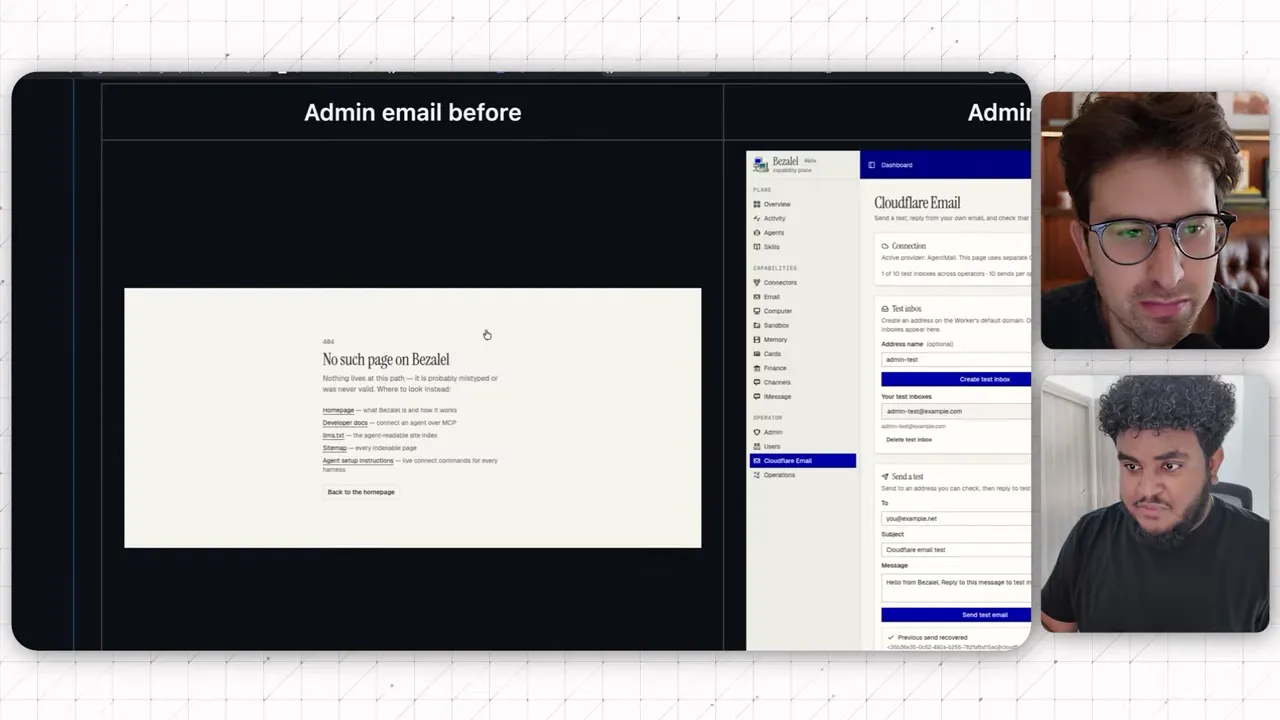
Another example involved giving an agent access to a computer environment. The first implementation did not work. Once the factory skills were applied, the subsequent evidence showed the agent actually using the app.
That is a much better review experience than trying to infer a working feature from a confident paragraph.
Failed proof sends the agent back to building
The powerful part is not merely attaching images to a pull request. It is making evidence a condition for moving forward.
Sometimes the agent captures the after state, inspects it, and realizes it has not actually finished the feature. The workflow tells it to return to the build step.
You should not need to interrupt with, “Your own screenshot shows this still doesn't work.” The skills define that failure and the next action.
That gives the factory its first feedback loop:
- Build the change.
- Collect and inspect the evidence.
- If the evidence does not meet the requirement, keep building.
- Repeat until the result is demonstrated.
For invisible improvements, use measurements
Not every change has a useful screenshot. A performance improvement might look identical before and after.
In that case, the agent needs tests and measured results.
Mic's performance example came from an app whose interactions did not feel snappy enough. The agent reported before-and-after timings, with page measurements falling from roughly 800 to 850 milliseconds to around 60 milliseconds.
The useful artifact is the comparison, not a screenshot of a page that looks the same.
The principle is simple:
- Visible changes: Supply screenshots or recordings.
- Performance changes: Supply measured timings and test results.
- Other nonvisual changes: Supply relevant output pairs or evidence that demonstrates the result.
This makes review more accessible, especially if you are nontechnical. You can evaluate whether the requested behavior exists without pretending you understand every line of code.
For front-end work, Mic increasingly relies on this visual evidence rather than reading every implementation detail. That is a shift in the human role: less line-by-line involvement, more management of outcomes and quality standards.
Step 4: Ship Through an Independent Code Review Loop
The agent has built the feature and demonstrated it. Now a separate reviewer checks the code.
Mic uses Greptile, an AI code review service, with a skill called Grep Loop. CodeRabbit and Macroscope are other options he mentions. The important thing is the independent review, not loyalty to one vendor.
In this workflow, the ship step prepares a pull request with the before-and-after evidence embedded in its description. Greptile reviews the change, leaves feedback, and returns a confidence score.
One example caught a pagination issue and a problem with preserving menu space. The implementation agent had missed them. That is not shocking. Human engineers miss things too. That is why review exists.
Turn feedback into a required loop
The factory does not stop at receiving comments. The implementation agent must address them.
- The agent opens or updates the pull request with evidence.
- The reviewer returns comments and a confidence score.
- If the required standard is not met, the agent returns to build.
- It fixes the issues, proves the updated result, and requests review again.
- It repeats until the review reaches five out of five and comments are resolved.
- It presents the pull request URL for human approval.
Mic describes a progression from three out of five, to four out of five, to five out of five. Every lower score means another trip through build, prove, and ship.
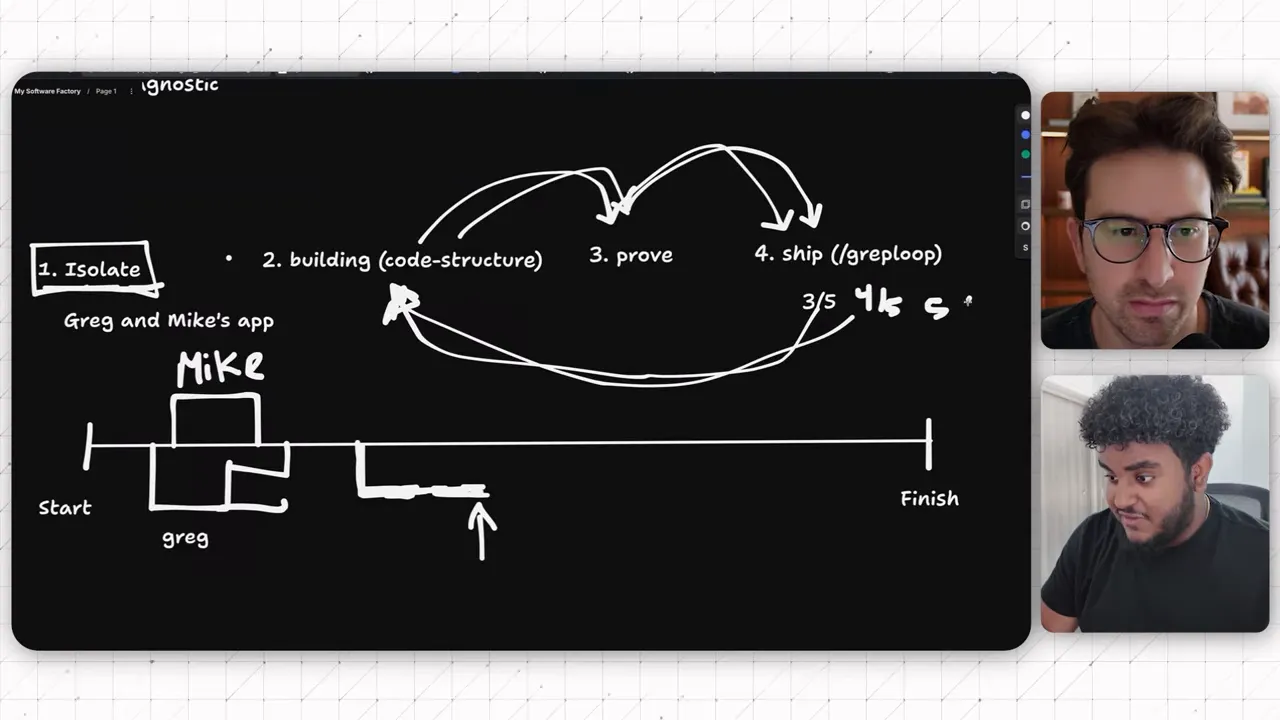
His setup also includes a Grep Loop Ops variation for especially large changes, around 10,000 changed lines or more. The workflow chooses the appropriate path automatically rather than requiring him to invoke every skill manually.
Only after the review standard is met does Mic step in to make the merge decision.
The score is a workflow gate, not a guarantee of flawless software. Its purpose is to make the agent resolve the reviewer's findings before handing the task back to a person.
Also, “ship” here does not mean the agent silently deploys everything to production. The demonstrated endpoint is a reviewed pull request ready for a human to merge. Deployment and release responsibilities still need a place in your process.
The Physical Factory Analogy Makes This Click
I think the simplest way to understand the whole system is to imagine a physical factory.
- Isolate is the dedicated station. A custom order gets its own space so it does not interfere with the rest of production.
- Build is the assembly line. The work happens according to established construction standards.
- Prove is quality control. Somebody checks whether the thing actually works before it leaves.
- Ship is final review and release. Failed checks send the product back for corrections. Approved work moves forward.
In software, the materials are files and code. The quality-control artifacts are tests, logs, screenshots, recordings, and measurements. The final handoff is a reviewed change that can be merged and released.
The analogy also explains why adding more agents is not enough. More workers without separate stations or quality control can create more chaos, not more useful output.
The factory works because each stage has a clear responsibility and a clear condition for moving on.
Build Your Process, Not Somebody Else's Tool Stack
The surprising thing about this setup is how little proprietary machinery defines it. The coordination lives in a few Markdown files, backed by Git, development tools, evidence collection, and a code review service.
A company can package those pieces into a product. But you do not have to buy a product labeled “software factory” to work this way.
To adapt the approach, make sure your instructions answer these questions:
- Where does each new feature start, and how is its workspace isolated?
- Which code structure standards must the agent follow?
- What counts as proof for the task?
- What happens when the proof fails?
- Who reviews the code, and how does the agent respond to feedback?
- When does a person enter the process to approve and merge?
- How is the feature workspace cleaned up afterward?
Mic makes his factory skills available for free. Use them as a starting point, but understand why each stage exists before adopting the whole setup.
|
The larger point is care for the person using your app. If you take your business seriously, the software deserves the same seriousness. An independent code review step is worth considering even if you never adopt the rest of this workflow.
We are getting access to increasingly capable agents. The opportunity is not just to generate more code. It is to organize that capability into a system you can trust enough to use.
Give agents separate workspaces. Give them building standards. Require evidence. Close the review loop. That is the software factory.


